![Trint_Logo-no-padding.png]](https://info.trint.com/hs-fs/hubfs/Trint_Logo-no-padding.png?height=40&name=Trint_Logo-no-padding.png)
When you’re looking to find key moments fast, without sacrificing editorial control, AI Highlights is here to help. You stay in charge of the decisions, while Trint’s AI creates a curated shortlist of highlights for you to work with.
This support guide will cover:
Creating AI Highlights
Start by selecting the ‘Suggest Highlights’ button at the top of your transcript.
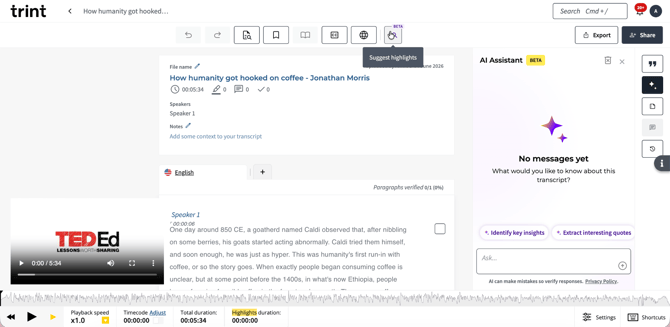
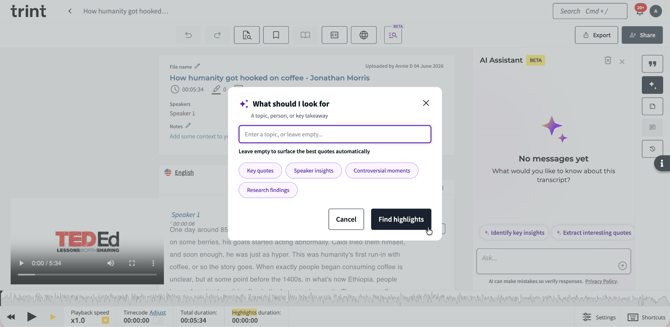
Then you’re ready to tell Trint’s AI Assistant what you’re looking to pick out. This could be anything from a topic, person or the best key takeaways.
Trint’s AI will then suggest the best moments from the transcript that match with what you’re looking for.
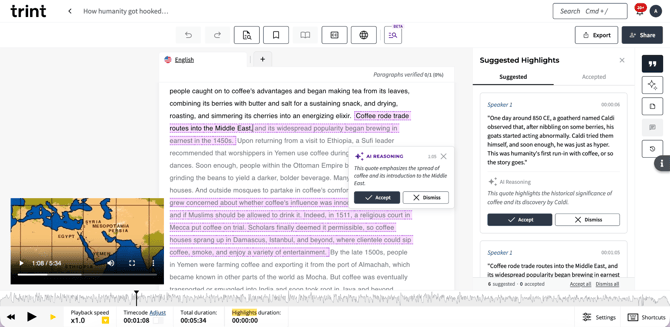
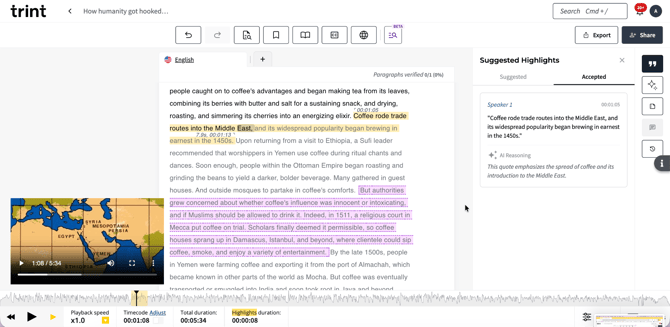
As a user, you can review the suggestions and approve or reject them, ending up with a curated set of highlights, ready to work with.
Your prompt can be as specific or broad as you choose, or can be left blank, in which case Trint will surface what we judge to be the most important moments in the transcript.
Keep in mind that there are two modes for AI Highlights. These are:
- Batch (Non-live): processes a transcript and suggests highlights all at once
- Live: monitors a live transcript as it comes in and surfaces suggestions continuously, for as long as required
FAQs
- Where does AI Highlights sit in the Trint app?
AI Highlights is a functionality of the AI Assistant. It works alongside the AI Assistant chat and AI-Generated Summaries.
- Do I have to keep the AI Highlights generated?
No, users are always able to approve or reject the suggestions. AI Highlighting does not make editorial decisions, that is still in the hands of the user.
- What languages does AI Highlights work in?
AI highlights are currently available in all languages that Trint offers.
- Is it safe to let Trint’s AI read my transcript?
Trint’s AI is trained externally so will never learn from your transcripts, meaning your data is always in safe hands.
We hope you have found this article useful. If you have any questions, please reach out to us at support@trint.com and our team will be happy to help.