![Trint_Logo-no-padding.png]](https://info.trint.com/hs-fs/hubfs/Trint_Logo-no-padding.png?height=40&name=Trint_Logo-no-padding.png)
An MCP server is an open standard that lets AI agents and assistants access external tools and data sources. The Trint MCP Connector uses this open standard, so that journalists, researchers, and media teams already working with Claude or another AI assistant, can bring Trint’s capabilities directly into their workflows, without switching context.
This is an implementation of Anthropic’s Model Context Protocol (MCP) that makes Trint’s capabilities available to any MCP-compatible AI tool. Trint is not just a standalone app, but a tool inside your AI workflow.
This support guide will cover:- What does the Trint MCP Connector do
- Why we've created it
- How to set up the Trint MCP Connector
- FAQs
What does the Trint MCP Connector do?
The Trint MCP Connector exposes a set of tools that a connected AI agent can call on the user’s behalf. These tools allow the AI to:
- Get transcript content – Retrieve the full text of any Trint file the user has access to
- Search – Query across a Trint workspace or specific folder to find relevant files or moments
- Find quotes – Identify the best quotes according to a prompt the user provides.
- View and play quotes – Render a quote within an agent and playback. Open a quote on app.trint.com to edit and comment.
- Export – Download a completed transcript or selected moments as edl, srt and docx
Together, these tools enable an end-to-end workflow: transcribe - find - extract - draft - export - entirely within an AI assistant or agentic pipeline.
Keep your eyes peeled for even more updates on the Trint MCP Connector, as we roll out more features and improvements.
Why have we created a Trint MCP Connector?
General purpose AI tools can do some of the functions of Trint, such as transcribe, summarise, find key quotes. But there are some things they can’t do. And because Trint is an AI tool workflow built for media production and newsrooms, we’re able to take what works in Trint and amplify it with the MCP Connector.
Here's an example of when the Trint MCP Connector is most beneficial:
You’ve got a quote from a speaker that you’re checking and verifying. With the Trint MCP Connector you can get the audio of the quote along with the response from the AI agent so that you can double check the transcript was correct while hearing the soundbite out loud, making sure it’s right for your content.
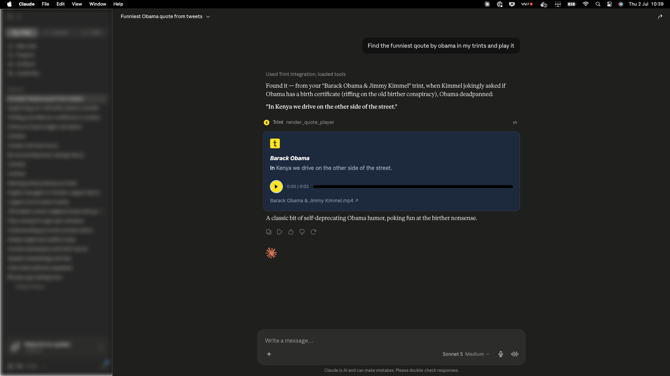
And every quote always has a mapping link back to the original transcript so you can easily open it up and work with it in the Trint UI.
How to set up the Trint MCP Connector
Setting the Trint MCP Connector with your AI tools is simple and can be done in under approximately 10 minutes.
Check out our step-by-step guide to setting up the Trint MCP Connector here.
FAQs
- Does the MCP only work with Claude?
No, it works with any MCP-compatible AI framework that supports the standard.
- Can I make my own skills to use within the Trint MCP Connector?
Yes, you can create a set of different skills within the MCP, depending on your workflow processes and what you want your output to be. - How does this affect my data security?
The MCP operates on behalf of the authenticated Trint user – it only accesses files that the user already has permission to see, governed by the same role-based access as the Trint platform.
We hope you have found this article useful. If you have any questions, please reach out to us at support@trint.com and our team will be happy to help.